Download Videos You Have the Right to Save
Works with publicly shared content across social platforms. Designed for saving your own posts, open-license videos, and publicly available media.

VidMedia - All Video Downloader
VidMedia - All Video Downloader
Save supported videos for offline viewing with HD quality, one-tap link detection, built-in browser, and a powerful download manager.

videodownloader.net: A responsible tool for saving publicly available content you have the right to download. Respect copyright. Download responsibly.
Video indiricimizi nasıl kullanırsınız?
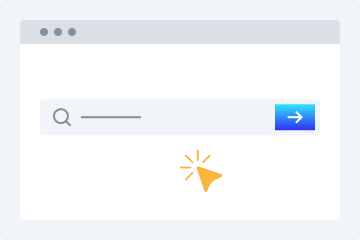
1. URL girin
Video URL’sini kopyalayıp verilen indirici alanına yapıştırın.
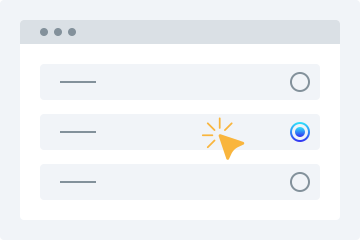
2. Kalite seçin
Videoyu indirmek istediğiniz kaliteyi seçin.
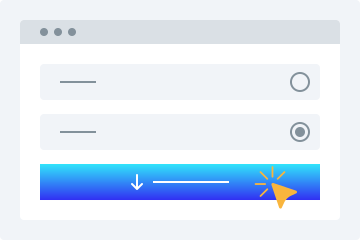
3. İndir
Videoyu cihazınıza kaydetmek için "Video İndir" düğmesine tıklayın.
Bu çevrimiçi video indirici, videoları istediğiniz formatta ücretsiz indirmenizi sağlayan birçok gelişmiş özelliğe sahiptir. Platform, desteklenen platformlardan herkese açık videoları kolayca indirmenizi sağlar. Aşağıda kullanıcıların yararlanabileceği başlıca özellikler yer alır.
Kullanımı kolay
İndiricimizi öne çıkaran en önemli unsur, son derece kullanıcı dostu arayüzüdür. Bu ücretsiz çevrimiçi video indiricinin düzeni, onu yeni başlayanlar için de ideal hale getirir. Tek yapmanız gereken favori videonuzun bağlantısını yukarıdaki kutuya yapıştırmaktır; gerisini araç halleder.
Birden fazla kalite seçeneği
Video kaydederken kalite kullanıcılar için en önemli konulardan biridir. HD video indiricimiz, ihtiyacınıza uygun kalitede video indirmenize olanak tanır. 360p, 480p, 720p, 1080p ve 4K seçenekleri arasından seçim yapabilirsiniz.
Tüm platformlar desteklenir
Videoyu herhangi bir cihazda indirmek istiyorsanız, video kaydedicimiz sizin için ideal çözümdür. Bilgisayarlar, tabletler ve akıllı telefonlarla uyumludur. İstediğiniz cihazdan kolayca erişebilir ve videolarınızı hareket halindeyken kaydedebilirsiniz.
Video önizleme
Bu bağlantı video indiricisine URL girdiğinizde, videonun oynatılabilir bir önizlemesini alırsınız. Böylece indirmek istediğiniz dosyanın doğru dosya olup olmadığını doğrulayabilirsiniz.
Kurulum gerekmez
Bu MP4 video indirme aracını kullanmak için herhangi bir yazılım veya eklenti yüklemeniz gerekmez. Videolarınızı kolayca indirmek için yalnızca kararlı bir internet bağlantısına ihtiyacınız vardır.
Video indirmeyi kolaylaştırın
Sosyal medya platformlarından video indirmek bu çevrimiçi araç sayesinde çok daha kolay hale gelir. İşte bu aracı kullanırken elde edeceğiniz bazı avantajlar.
Kayıt gerekmez
Birçok indirici, kullanımdan önce kayıt ister. Eğer sürekli kayıt olmaktan yorulduysanız ve üye olmadan video kaydetmek istiyorsanız, bu web video indiricisi sizin için uygundur. Aracı kullanmak için kayıt olmanız gerekmez.
Birden fazla site için tek indirici
Kullanıcıların farklı sitelerden video indirmek için farklı araçlar aramasına gerek yoktur. Bu araç, birçok farklı platformdan video indirmenizi sağlar.
Videoları hızlı indirin
Video kaydedicimiz, sonuçları birkaç saniye içinde üreten gelişmiş algoritmalara dayanır. Bağlantıyı alır, videoyu işler ve kaliteyi seçtikten sonra videonuzu indirilebilir hale getirir.
Kişisel kullanım için video indirin
Kullanıcılar kişisel kullanım için ihtiyaç duydukları kadar video indirebilir. Videolarınızı katı sınırlamalar olmadan kaydedebilirsiniz.
Why Choose videodownloader.net?
Works Where You Need It
Supports publicly accessible video links across major social platforms and media sites - ideal for saving your own posts, archiving public announcements, downloading Creative Commons content, and accessing open-license media you have the right to use.
No Software Installation Required
Our tool runs entirely in your web browser. There is no need to download, install, or update any software. This means no risk of malware, no compatibility issues with your operating system, and no storage space on your device. It works on Windows, macOS, Linux, Android, and iOS equally well.
Privacy First
We do not require registration or account creation for basic downloads. Your submitted URLs are processed temporarily and are not permanently stored on our servers. We do not track your download history or share your personal data with third parties. Your privacy is built into our service from the ground up.
Fast Processing & Multiple Quality Options
Our servers process download requests quickly, typically delivering results within seconds. Choose from multiple quality levels ranging from standard definition (360p, 480p) to high definition (720p, 1080p) and even 4K where available. You can also extract audio-only MP3 files from any video.
Copyright Responsible
We block platforms where downloading is explicitly prohibited. Our tool is built for legitimate use: saving your own content, accessing Creative Commons media, and downloading publicly available videos where permitted.
Sık sorulan sorular
Telefonuma nasıl video indiririm?
- Web tarayıcınızdan video indirme aracımıza erişin.
- Seçtiğiniz videonun URL’sini verilen alana girin.
- İhtiyacınıza uygun video kalitesini seçin.
- İstediğiniz videoyu cihazınıza kaydetmek için “Video İndir” düğmesine dokunun.
Video indirici güvenli mi?
Evet, aracımız %100 güvenlidir. İndirdiğiniz dosyaları sunucularımızda saklamıyoruz.
Is it legal to download videos for personal use?
This tool is intended for downloading content you own, have explicit permission to download, or that is published under an open license such as Creative Commons. This includes your own social media posts, videos shared by businesses or creators for public reuse, public domain content, and any material where the publisher has granted download rights. Always verify you have the necessary rights before downloading any content. We do not support or condone downloading copyrighted material without the rights holder’s permission, and we block platforms where downloading is explicitly prohibited by the provider.
What video formats are supported?
We primarily provide downloads in MP4 format, which is the most widely compatible video format across all devices and platforms. MP4 works natively on Windows, macOS, Android, iOS, and most smart TVs and media players. For audio extraction, we provide MP3 format at various bitrates. Additional formats may be supported depending on the source platform and available encoding options.
Does this work on iPhone / iOS?
Yes, videodownloader.net works on iPhone, iPad, and other iOS devices through the Safari browser. Since our tool is entirely web-based, there is no app to install. Simply visit our website, paste the video URL, and download. Note that iOS has certain restrictions on where downloaded files can be saved. You may need to use the Files app or a third-party document manager to access your downloaded content. For the best experience on iOS, we recommend using Safari as your browser.
How do I download a private or password-protected video?
Our tool can only access videos that are publicly accessible or videos to which you already have access (such as your own unlisted videos). We cannot bypass privacy settings, password protection, or paywalls. If a video requires you to be logged into the platform to view it, you will need to ensure you are logged in on that platform first, then copy the URL and paste it into our downloader. Note that some platforms restrict downloading of private content regardless of access.
Is my data safe when I use this tool?
Yes, your privacy and data security are important to us. We use HTTPS encryption for all data transmitted between your browser and our servers. The URLs you submit are processed temporarily on our servers to generate download links and are not permanently stored. We do not sell your personal data or share it with third parties for marketing purposes. Our full privacy policy details exactly what data we collect and how it is used. We recommend reviewing it for complete transparency.
Why is my download link not working?
Download links can fail for several reasons: the source video may have been removed or made private, your internet connection may be unstable, the file may be too large for your device's storage, or the platform may have changed its URL structure. We recommend first verifying that the video URL still works in your browser. If it does, try copying the URL again and submitting it fresh. If problems persist, our platform may be experiencing temporary issues, or the specific platform may have implemented new restrictions that we are working to support.
Can I download audio only (MP3)?
Yes, you can extract the audio track from a video as an MP3 file. This is useful for saving audio from videos you have rights to - such as your own recordings, publicly licensed lectures, open-license podcasts, or content published for free use. Please ensure you have the right to download and use the audio before extracting it.
Is there a download limit?
Free users can download videos without a strict daily limit for legitimate personal use. We apply rate limiting to ensure fair access for all users and to prevent misuse. Premium subscribers get priority processing and faster speeds. All use of this tool must comply with our Terms of Service and applicable copyright law.
How is this different from other downloaders?
Unlike tools built purely for bulk or unrestricted downloading, videodownloader.net is designed for legitimate personal use cases: saving your own social media content, downloading open-license and Creative Commons videos, and accessing publicly available media you have the right to keep. We actively block platforms where downloading is prohibited by the provider, and we maintain a clear DMCA compliance process for any content concerns.